


Nol Card Balance: How to Transfer Nol Card Balance
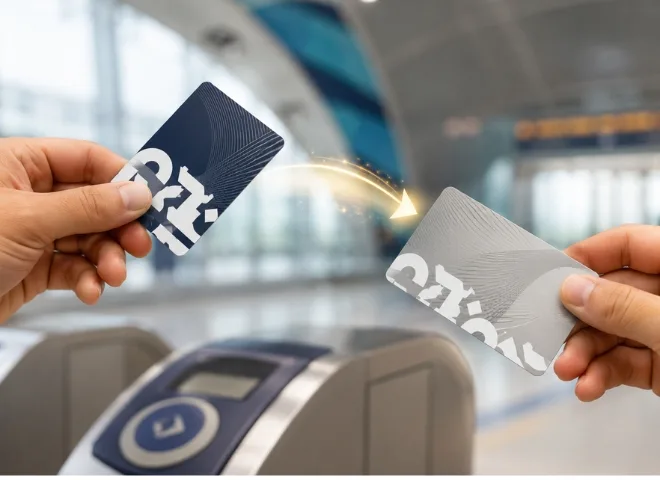
In UAE Dubai Nol Card plays a vital role when you go from one place to another. It is essential for travelers and for locals both. It is acceptable in many means of transportation systems, including buses, trams, and specific companies like the Dubai Metro. These means of transportation are known for their user-friendly services. What if someone needs to move your Nol Card balance to another card? You may easily move your Nol Card balance whether you’re helping a buddy, replacing a missing cards. This thorough handbook on how to do it is here.
Understand the NOL card and its functionality
Dubai’s Roads and Transport Authority (RTA) introduced the Nol Card, a contactless smart card. It lets some other services including parking and retail purchases, in addition to public transit payments, be paid. Four categories of Nol Cards are Red, Silver, Gold, and Blue (personalized), each offering a range of advantages including auto top-up, customized use, and more. You can load money onto the card and utilize it until the balance is exhausted.
Steps Involved in Transferring Balance from One Nol Card to Another
Transferring a balance from one Nol Card to another involves a few straightforward steps:
- Ensure both the source and target Nol Cards are valid and not expired.
- Choose your preferred transfer method, mobile app, ticket vending machine, RTA service center, or eWallet.
- Initiate the transfer by following the instructions specific to that platform.
- Confirm the transaction and check your new balance.
Methods of Transferring Nol Card Balances
There are several methods available to facilitate Nol Card balance transfers:
- Online via the RTA Mobile App
- Through Ticket Vending Machines
- At RTA Service Centers
- Using Nol eWallet for card-to-card transfers
Each method has its pros and cons depending on convenience, accessibility, and any applicable fees.
Online Nol Card Balance Transfer via RTA Mobile App
The most convenient and user-friendly method to transfer your Nol balance is through the RTA Dubai Mobile App:
- Download and open the RTA app.
- Log in or create an account.
- Navigate to the “Nol” section and select “Balance Transfer.”
- Enter the Nol Card numbers of both the sender and receiver.
- Input the amount you wish to transfer.
- Confirm the details and authorize the transaction.
Note: Your Nol Cards need to be registered with your account for this method to work.
Transfer Nol Card Balance Through the Ticket Vending Machine
Another straightforward option is using one of the many Ticket Vending Machines (TVMs) located across metro stations:
- Insert or scan your source Nol Card.
- Choose the “Balance Transfer” option.
- Insert or scan the target Nol Card.
- Enter the amount to be transferred.
- Confirm the transfer and collect your receipt.
This is a handy method for those already at a metro station and looking for a quick solution.
Transferring Nol Card Balance at RTA Service Centers
For those who prefer human assistance or are dealing with larger or more complicated transactions, RTA Service Centers are the go-to option:
- Visit your nearest RTA service center.
- Provide both Nol Cards and your Emirates ID (for personalized cards).
- Inform the representative of the amount to be transferred.
- The agent will complete the process and provide a confirmation receipt.
This method is especially useful if your card is damaged or if you’re transferring balance from a lost card (proof required).
Nol to Nol Transfer via eWallet
The Nol eWallet provides a more flexible and integrated option for regular users:
- Register for an RTA eWallet account via their official portal.
- Add your Nol Cards to your account.
- Fund your eWallet and choose the option to transfer balance between registered cards.
- Enter the details and confirm the transaction.
This is ideal for managing multiple Nol Cards under one profile, such as family members or corporate users.
Nol Card Balance Transfer Charges and Fees
While some balance transfers are free, others may incur nominal charges. Here’s a general breakdown:
- Mobile App & eWallet: Usually free or a minimal charge AED 1-2.
- TVM Transfer: Typically free.
- RTA Service Centers: Fees may vary depending on card types and urgency.
Always confirm the applicable fee at the point of transaction to avoid surprises.
Benefits of Nol Card Balance Transfer
Transferring your Nol Card balance offers several advantages:
- Flexibility: Share or move funds between family or friends.
- Card Replacement: Easily retrieve and transfer balance from a lost or expired card.
- Budget Management: Consolidate balances from multiple cards into one.
- Convenience: Avoid carrying multiple cards with low balances.
These features make Nol Cards not just smart but also highly adaptable.
Various Methods to Check NOL Card Balance
Before and after transferring balance, you may want to verify the amount on your card. Here’s how you can do it:
- RTA Website: Enter your Nol Card number for a quick check.
- RTA Mobile App: View real-time balance updates.
- TVMs and Metro Station Readers: Tap your card to see your current balance.
- SMS Alerts (for registered cards): Opt-in for balance alerts via SMS.
RTA Service Centers: Names & Locations
RTA Service Centers are spread across Dubai to ensure accessibility:
- Al Barsha Customer Happiness Center
- Deira Customer Happiness Center
- Al Manara Customer Happiness Center
- Umm Ramool Center
- Al Kifaf Customer Happiness Center
These centers offer full Nol Card services including top-ups, balance inquiries, and transfers. Always carry identification, especially when dealing with personalized Nol Cards.
Conclusion:
For easy transportation across public transit systems like buses, trams, and the metro, as well as parking and certain retail payments, Dubai’s RTA introduced the Nol Card, a necessary smart card. One useful capability lets consumers manage funds across several cards, replace lost or expired cards, or assist friends and family by transferring balance from one Nol Card to another. With little or no charges depending on the means, this can be done through the RTA mobile app, ticket vending machines, RTA service centers, or through the Nol eWallet. Although the Nol Card works well for public transportation, Royal Star Car Rental in Dubai offers a premium solution for those who would rather drive for convenience, freedom, and adaptability. Royal Star offers a great variety of vehicles and rental choices, perfect to complement Dubai’s public transportation system for both residents and visitors whether your Nol balance dips or you have a road trip planned outside the metro routes.
FAQs:
Question: What is a Nol Card?
Answer: It is a card used to pay the fare of your travel in public transportation in the UAE.
Question: Who introduced the Nol Card in the UAE?
Answer: Dubai’s Roads and Transport Authority (RTA) introduced the Nol Card
Question: can we transfer balance from one Nol Card to another?
Answer: Ensure both the source and target Nol Cards are valid and not expired. Choose your preferred transfer method, mobile app, ticket vending machine, RTA service center, or eWallet. Initiate the transfer by following the instructions specific to that platform. Confirm the transaction and check your new balance.
Question: what are the names and locations of RTA service centres?
Answer: Al Barsha Customer Happiness Center, Deira Customer Happiness Center, Al Manara Customer Happiness Center, Umm Ramool Center andAl Kifaf Customer Happiness Center.
Question: What are the different methods to check Nol card balance?
Answer: There are so many ways of checking your Nol card balance, such as RTA website, RTA mobile App, TVMs, and SMS.
Share